Monday, 11 September 2017

AOS service not staring due to EDT size error

Object Server 02:  Unexpected situation
More Information: Total field length cannot exceed 64K. Please re-factor your table *BIDateDimensionTrans  
Total field length cannot exceed 64K. Please re-factor your table *BIDateDimensionTrans
Due to this Microsoft Dynamics AX AOS crashed. Microsoft Dynamics AX AOS service is not Starting.
The above error start occurring when the developer changed the EDT size (in my case “Name”) to higher number. So without opening the AOS how to resolve the issue.
For Solution follow below steps:
Go to Event management and review the errors thrown when AOS starting
So, First thing required is other AOS where you can do below steps.
  1. Create Model in other AOS which is same as the one where issue arise
  1. Update the EDT where the error. (In this case, reduce the size). Identify last updated EDT.
  2. Add EDT to the model
  3. Export model
Export-AXModel -model EDT_SOL -file c:\EDT_SOL.axmodel -Config <Configuration Name>
  1. Import Model to the AOS where the issue is.
Install-AXModel -File c:\EDT_SOL.axmodel -Config APPL_STAG_AX12R3
  1. Resolve conflict, if any


Comment below if this article helps you.

Tuesday, 1 August 2017

The number of dimension values specified in is different from the number set up in the active format for data entities.

Error:
The number of dimension values specified in 9999971 is different from the number set up in the active format for data entities.
The mentioned above error was generated when importing the journal entry in Dynamics 365. The error says the account mentioned in the field do not match with the dimensions specified.  The screen as below:


Import file has the values as below screen:
All the values are mentioned in file looks proper though it throws the error while import.
Solution:
I tried to import the file multiple times and the error was the same again and again. As in AX 2012 the same data imported without any issue. So what could be issue on Dynamics 365
Then reviewed the Account structure as we set the dimensions with accounts there (General ledger > Char of account > Structure > Configure account structure). In the active account structure on the legal entity (attached in ledger) and allowed blank values is already selected.
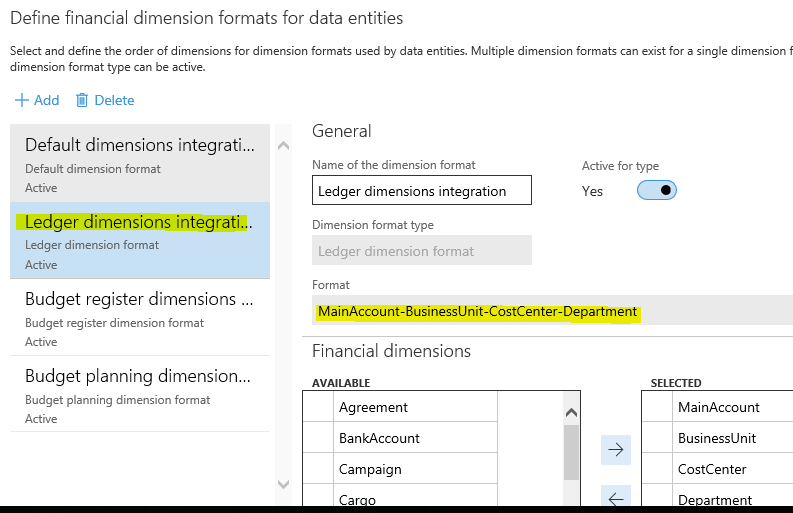
After some search and review cause of issue found and the issue on set up of Financial dimension configuration for integrating applications


Verify format define for the ledger dimensions integrations. As on the screen MainAccounts-BusinessUnit-CostCenter-Department. So it is require to follow the format define for import.