Tuesday, 1 August 2017

The number of dimension values specified in is different from the number set up in the active format for data entities.

Error:
The number of dimension values specified in 9999971 is different from the number set up in the active format for data entities.
The mentioned above error was generated when importing the journal entry in Dynamics 365. The error says the account mentioned in the field do not match with the dimensions specified.  The screen as below:


Import file has the values as below screen:

All the values are mentioned in file looks proper though it throws the error while import.
Solution:
I tried to import the file multiple times and the error was the same again and again. As in AX 2012 the same data imported without any issue. So what could be issue on Dynamics 365
Then reviewed the Account structure as we set the dimensions with accounts there (General ledger > Char of account > Structure > Configure account structure). In the active account structure on the legal entity (attached in ledger) and allowed blank values is already selected.
After some search and review cause of issue found and the issue on set up of Financial dimension configuration for integrating applications
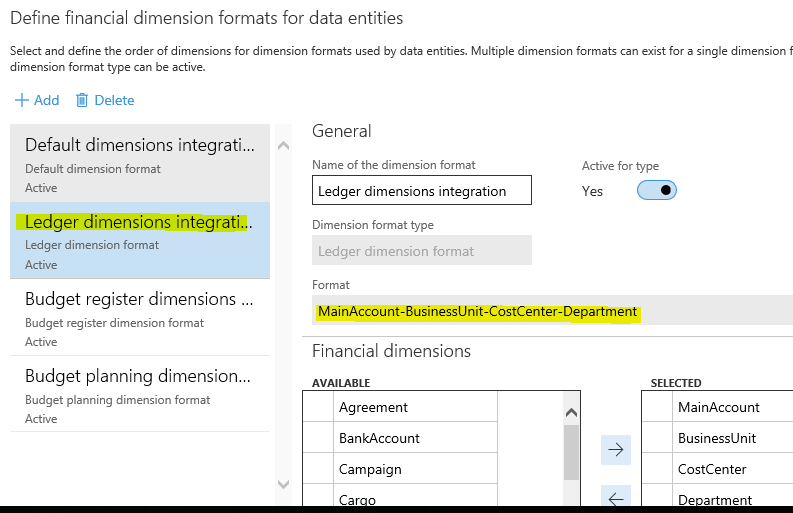

Verify format define for the ledger dimensions integrations. As on the screen MainAccounts-BusinessUnit-CostCenter-Department. So it is require to follow the format define for import.


Friday, 19 May 2017

Dynamics AX 2012 Multiple join on same table using QueryBuildDataSource (qbds)


Multiple join on same table using QueryBuildDataSource (qbds) Dynamics AX 2012
Once I come across the situation where there I have to build query using QueryBuildDataSource(qbds) with multiple tables and even same table with multiple join. By the simple joins it populate wrong data output (multiple row for each single row in main table).

So below is the example how to achieve the proper output having multiple join on same table using qbds in Microsoft dynamics ax 2012

QueryBuildDataSource qbdsInventJournalTable,qbdsInventJournalTrans,qbdsInventdim,qbdsInventdim1;

   QueryRun    qr;
   Query       q;
   InventJournalTrans  ObjInventJournalTrans;
   InventDim           ObjInventDim,ObjInventDim1;
   
   
   q= new Query();

   qbdsInventJournalTable = q.addDataSource(tableNum(InventJournalTable));
   
   qbdsInventJournalTrans = qbdsInventJournalTable.addDataSource(tableNum(InventJournalTrans));
   qbdsInventJournalTrans.relations(true);
   
   qbdsInventdim = qbdsInventJournalTrans.addDataSource(tablenum(Inventdim));
   qbdsInventdim.joinMode(JoinMode::InnerJoin);
   qbdsInventdim.addLink(fieldNum(Inventdim,InventDimId),fieldNum(InventJournalTrans,InventDimId));
   qbdsInventdim.fetchMode(QueryFetchMode::One2One);

   qbdsInventdim1 = qbdsInventJournalTrans.addDataSource(tablenum(Inventdim));
   qbdsInventdim1.joinMode(JoinMode::InnerJoin);
   qbdsInventdim1.addLink(fieldNum(Inventdim,InventDimId),fieldNum(InventJournalTrans,ToInventDimId));
   qbdsInventdim1.fetchMode(QueryFetchMode::One2One);

   qr = new QueryRun(q);

   while(qr.next())
   {
       ObjInventJournalTrans = qr.get(tableNum(InventJournalTrans));
       ObjInventDim = qr.get(tableNum(InventDim),1);
       ObjInventDim1 = qr.get(tableNum(InventDim),2);
// code to insert on table
   }